Chores and homework first. Proof in a photo. Then screen time.
Updated 2026-09-14
KlusQuest puts the tasks before the screen. Your child does the chore, the homework or the reading, sends a photo as proof, and you approve with one tap. Only then do coins land, and coins are the only thing that unlocks screen time in the apps you chose.
Nothing approves itself. You decide, every time, from your own phone, and a task you are not happy with goes back with a tip instead of a lecture.
One subscription for the whole family.
How it works
- 1
You set the tasks
Pick from templates by age and category or write your own. Each task gets a coin value, a recurrence, a time of day and a switch for whether a photo is required. Three tasks from templates take under a minute.
- 2
They do it and send a photo
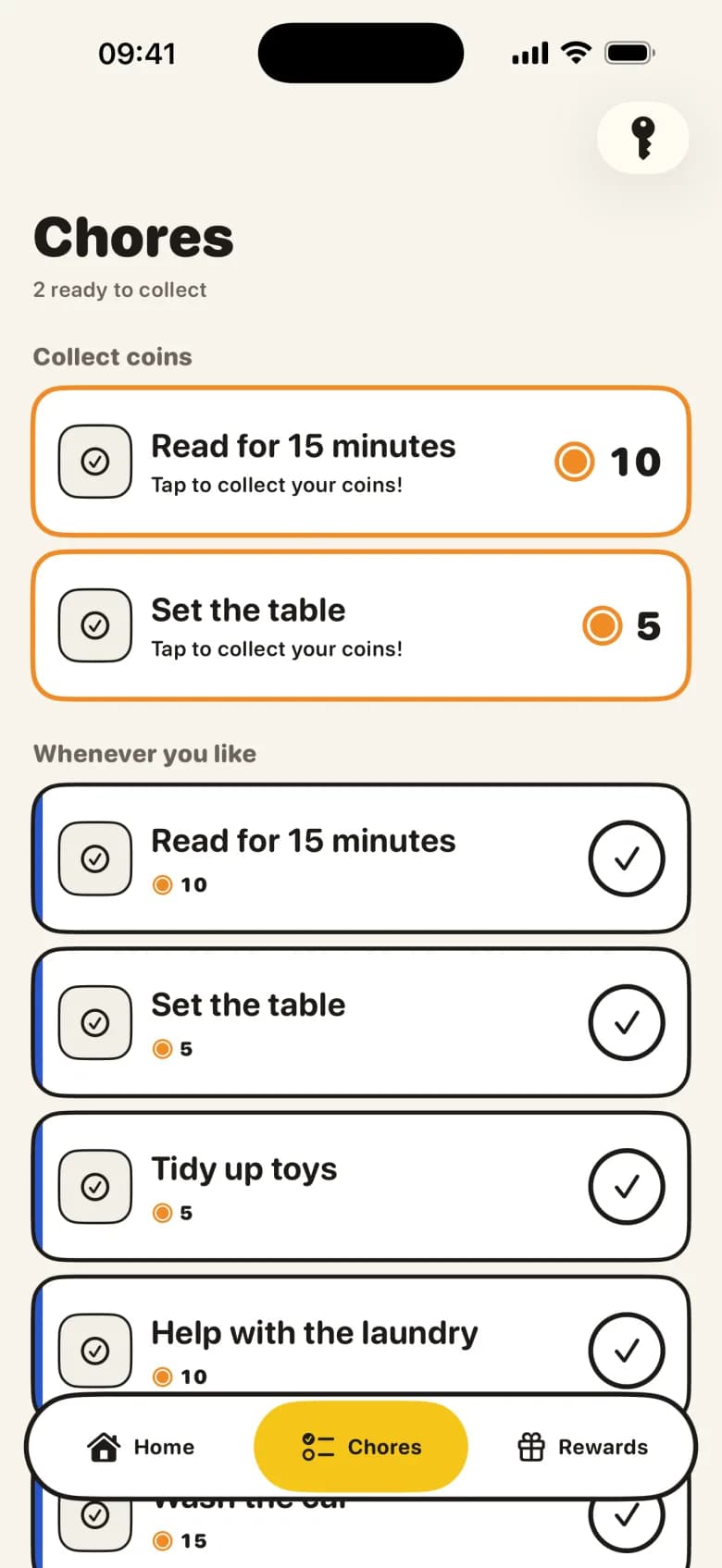
The task board on your child's phone shows what is open today. They tick a task off and, where you asked for one, take a photo. The task moves to waiting: the board says a parent is checking.
- 3
You approve with one tap, or send it back
Your home screen shows how many tasks are waiting per child, with the photo attached. Approve, approve all at once, or send it back with a tip such as "almost, check the corners" or "photo please". The task returns to the board with your tip visible.
- 4
Coins unlock screen time
Approved coins land in your child's wallet. When their daily free minutes are used up, they swap coins for minutes in the locked apps at the rate you set. The default is one coin for one minute.
What happens on your child's phone
The board is grouped by time of day, so a morning chore does not hide behind an evening one. Open tasks are the main thing on the screen. A task that is waiting for you shows a small note that a parent is checking. An approved task is the loudest thing on the board: your child taps it and the coins move into the wallet.
A task they did not get to simply expires at the end of its period. It shows up in history, not on tomorrow's board, and it costs nothing. There is no negative balance in KlusQuest.
What you see as the parent
Your home screen leads with the number that matters: tasks waiting for a decision, per child. Each card carries the photo, the task and the coins at stake. Once you decide, the photo is queued for deletion. KlusQuest keeps the decision, not the picture, retrying the deletion automatically if the network is unavailable.
You set the household coin-to-minutes rate once. Approved coins can then be exchanged for earned screen time, while any other reward remains a separate agreement your family handles outside KlusQuest.
What is deliberately not there
- No automatic approval — A ticked box is a claim, not a result. Every task waits for a parent, even the ones without a photo.
- No debt and no penalties — Missed tasks expire. Coins can be reduced with a reason, but the balance never goes below zero and never during a running timer.
- No reading of messages, browsing or location — KlusQuest sees the photo your child chose to send, and nothing else on the phone.
- No payments through the app — Coins unlock screen time in KlusQuest. The app does not hold, transfer or pay out money; any other family reward is handled separately.
What you need
- A parent iPhone or iPad and KlusQuest installed on it — Tasks, approvals and rates live on your phone. iOS 17.4 or later.
- The child's own iPhone or iPad — The task board, photo and screen-time lock run on their device, paired to your family with a code.
- A child Apple Account in Family Sharing (recommended) — This allows you to apply Screen Time settings that can restrict app deletion. However, Family Sharing is not MDM supervision, and a child Apple Account does not guarantee against all bypasses or deletions.
Questions parents ask about tasks and screen time
Does every task need a photo?
No. You switch photo proof on per task. Reading and homework often do not need one; the dishwasher and a tidy room usually do. A task without a photo still waits for your approval.
What if my child forgets to take the photo?
The task arrives without one and KlusQuest says so. You can ask for the photo by sending the task back with the "photo please" tip, or take their word for it and approve.
Can I change how many minutes a coin is worth?
Yes. The coins-to-minutes rate is a household setting you change at any time. Every wallet and every shield message uses the new rate from that moment on.
What happens when a task is not done?
It expires without being handed in, the coins are simply not earned, and a recurring task comes back fresh for the next period. Nothing is deducted.
See the App Store for the current purchase options for your region.